What This Guide Covers
This article walks you through the specific VAT challenges that Shopify and WooCommerce merchants face, from digital goods taxation to the EU's One Stop Shop scheme. You'll learn how to identify your obligations, set up compliant processes on each platform, and avoid the most common filing mistakes. By the end, you'll have a clear, step-by-step path to keeping your store VAT-compliant no matter where your customers are.
The global retail e-commerce market is on track to reach USD 6.9 trillion by 2025, and with over 30 million online stores now operating worldwide, tax authorities are paying closer attention than ever. If you're running a Shopify or WooCommerce store that ships internationally, VAT compliance isn't optional. It's the cost of doing business.
Understand Why VAT Is Uniquely Tricky for E-Commerce Platforms
Before you configure a single tax setting, it helps to understand why Shopify and WooCommerce sellers face VAT problems that traditional retailers don't.
The core issue is simple: your customers are everywhere. And 52% of online shoppers report shopping internationally, which means your tax exposure spans multiple jurisdictions, each with its own rates, thresholds, and filing schedules. A physical store in Berlin deals with one VAT rate. A WooCommerce store selling digital templates to customers in France, Ireland, and Sweden deals with three, and the rules differ for each.
Here's what makes platform-based selling particularly complex:
-
Digital goods have their own VAT category. E-books, software, online courses, and digital downloads are taxed at the customer's location, not yours. This applies even if you have no physical presence in that country.
-
Marketplace facilitator rules shift liability. In some jurisdictions, the platform itself (like Shopify's marketplace channels) collects and remits VAT. In others, the seller remains fully responsible.
-
Each country sets its own rate. As noted in reporting on digital VAT complexity, different jurisdictions apply different VAT rates, making competitive pricing across the EU a genuine headache.
Recognizing these layers is the first step toward building a compliance process that actually holds up under scrutiny. And the next step is figuring out which scheme applies to your specific situation.
Determine Whether OSS or Standard Registration Applies
Once you know VAT is relevant, the question becomes: do you register in every country where you sell, or is there a simpler route?
For most Shopify and WooCommerce merchants selling to EU consumers, the One Stop Shop (OSS) scheme is the answer. Introduced in July 2021, OSS lets you file a single VAT return in one EU member state to cover distance sales across the entire bloc. This eliminates the need for separate registrations in each country, at least up to a point.
For a comprehensive perspective on how the OSS and IOSS systems revolutionized cross-border VAT registration, see the VAT Tax Registration: Complete Step-by-Step Guide.
When OSS Works
The OSS scheme is designed for businesses that sell goods cross-border to EU consumers. The Import One Stop Shop (IOSS) variant covers goods shipped from outside the EU, and it applies to goods with a shipment value of €150 or less. If your average order value stays under that threshold, IOSS can dramatically simplify your import VAT obligations.
Key points to assess:
-
Are you established in the EU? If yes, the Union OSS scheme likely applies to your intra-EU distance sales.
-
Are you shipping from outside the EU? Then IOSS is the relevant framework for low-value consignments.
-
Do you sell digital goods or services? The non-Union OSS scheme covers electronically supplied services sold by non-EU businesses to EU consumers.
For a detailed comparison of schemes and threshold triggers, check How Do I Stay VAT Compliant When Selling in Multiple Countries?.
When You Still Need Country-by-Country Registration
OSS doesn't cover everything. If you hold inventory in multiple EU countries (common with Amazon FBA or third-party fulfillment networks), you'll likely need local VAT registrations in each warehouse country. The same applies if you exceed the €150 IOSS threshold on individual shipments.
Understanding which scheme fits your store's setup is critical. Get it wrong, and you're either overpaying through unnecessary registrations or underpaying and risking penalties. With that clarity, you can move on to the platform-specific configuration.
Configure VAT Settings on Shopify

Shopify offers built-in tax tools, but they require careful setup to reflect your actual obligations.
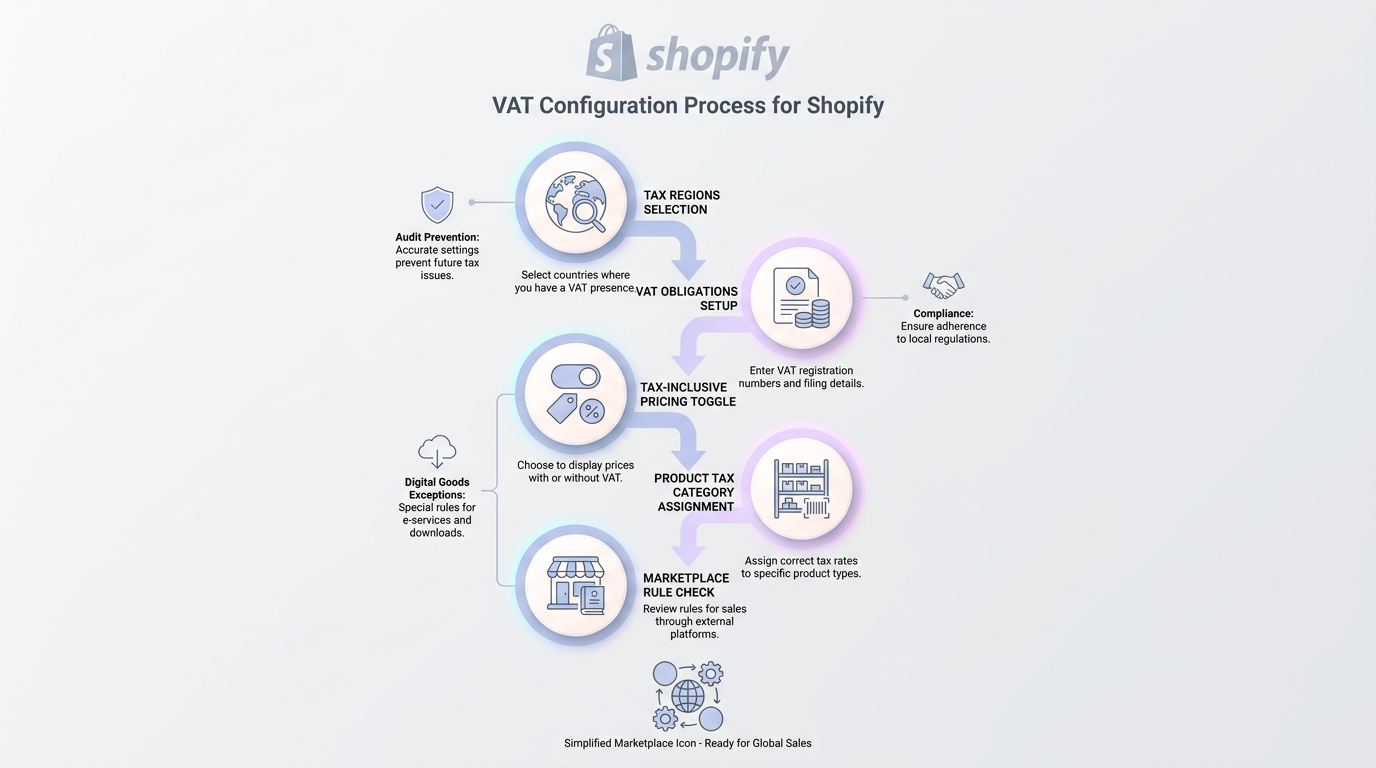
Start in the Shopify admin under Settings > Taxes and duties. Here's the sequence:
-
Set your tax regions. Add every country or region where you have VAT obligations. For EU sellers using OSS, you'll still need to configure individual country rates since OSS requires you to charge the destination country's rate.
-
Enable tax-inclusive pricing if selling in the EU. European consumers expect prices that include VAT. Toggle this setting to avoid checkout surprises and cart abandonment.
-
Review product tax categories. Digital goods, physical products, and certain food or children's items may carry reduced or zero rates. Assign the correct tax category to each product.
-
Check marketplace collection rules. If you sell through Shopify's integration with marketplaces like Amazon or eBay, the marketplace may already collect VAT on your behalf in certain jurisdictions. Double-charging is a real risk here.
Watch for Digital Goods Exceptions
Shopify doesn't automatically distinguish between a physical book (which may carry a reduced VAT rate in some EU countries) and an e-book (which may not). You need to manually verify that each product's tax treatment matches the local rules. A WooCommerce plugin might handle this differently, which brings us to the next step.
For a practical overview of digital product classifications and obligations in the EU, visit Handling VAT for Digital Services: A Practical Guide.
Properly configured tax settings prevent the most common audit triggers. But Shopify's setup is only half the equation if you're also running a WooCommerce store, or considering a migration.
Set Up VAT Compliance on WooCommerce
WooCommerce gives you more control over tax configuration, but that flexibility also means more room for error.
The core tax settings live under WooCommerce > Settings > Tax. Here's how to approach the setup:
-
Choose your tax calculation basis. WooCommerce lets you calculate tax based on the shop's base address, the customer's shipping address, or billing address. For EU VAT on digital goods, you must use the customer's location.
-
Create tax rate tables. You'll need a row for every country-rate combination. For the EU alone, that's 27 member states, each potentially with standard, reduced, and super-reduced rates.
-
Install a tax display extension for B2B. If you sell to VAT-registered businesses, you need the ability to show net prices and validate VAT numbers through the VIES system.
-
Assign tax classes to products. Like Shopify, WooCommerce requires you to categorize products. Digital goods, physical goods, and exempt items each need their own class.
Handling Mixed Carts
A customer who orders a physical product and a digital download in the same transaction creates a mixed cart, and the VAT treatment may differ for each item. WooCommerce handles this through tax classes, but only if you've set them up correctly. Test a few sample transactions before going live.
For business owners launching or scaling across new EU markets, the VAT Compliance Checklist for Startups and Small Businesses gives step-by-step guidance relevant to WooCommerce and Shopify alike.
The technical configuration is just the foundation. What matters just as much, and what trips up most merchants, is the ongoing filing and reporting that comes afterward.
Build a Reliable Filing and Reporting Workflow
Correct tax settings mean nothing if your filings are late, inaccurate, or missing entirely.
Every VAT registration carries a recurring filing obligation. Depending on the country, that could be monthly, quarterly, or annually. Miss a deadline, and you're looking at penalties, interest charges, and in some cases, marketplace account suspensions.
Here's what a solid workflow looks like:
-
Maintain a filing calendar. List every jurisdiction, its filing frequency, and upcoming deadlines.
-
Reconcile sales data monthly. Compare your platform's sales reports against your accounting records. Discrepancies between Shopify/WooCommerce data and your filings are a top audit trigger.
-
Archive invoices and transaction records. Most EU countries require you to retain records for 5 to 10 years.
-
Monitor threshold changes. VAT thresholds and rates shift regularly. A rate that was correct in January may not be correct in July.
For a full breakdown of filing best practices, penalties, and tech solutions, review VAT Filing & Returns: A Complete Guide for Businesses.
For merchants selling across multiple countries, this is where professional support becomes essential. 1StopVAT, a global VAT compliance provider with 40+ certified tax specialists covering 100+ countries, works directly with marketplace sellers to handle registrations, filings, and ongoing compliance. Their team provides dedicated guidance tailored to platform-specific challenges, so store owners can focus on selling rather than chasing deadlines.
Consistent filing protects your store from penalties and keeps your marketplace accounts in good standing. But even the best workflow won't help if you're making one of the common mistakes below.
Avoid the Most Common VAT Mistakes
Knowing what to do is half the battle. Knowing what not to do saves you from expensive corrections.
For a full rundown of the pitfalls - such as using the wrong rates, misclassifying supplies, and ignoring multijurisdictional triggers - see Determining VAT: mistakes to avoid.
Mistake 1: Ignoring Marketplace Deemed Supplier Rules
When you sell via a marketplace integration, the marketplace may be the deemed supplier for VAT purposes. If you also charge VAT at checkout, the customer pays tax twice, and you're liable for the refund and the reputational damage.
For a deeper checklist on marketplace obligations and seller responsibilities, visit Marketplace VAT Obligations for Online Sellers: What You Need to Know.
Mistake 2: Treating All Digital Products the Same
An online course and a downloadable PDF may seem similar, but their VAT treatment can differ by country. Some jurisdictions apply reduced rates to educational content while taxing other digital goods at the standard rate. Always verify on a product-by-product, country-by-country basis.
Mistake 3: Relying Solely on Platform Defaults
Neither Shopify nor WooCommerce guarantees that its default tax settings are compliant with your specific obligations. These platforms provide tools, not tax advice. The responsibility stays with you.
Avoiding these pitfalls rounds out your compliance setup and brings us to the questions merchants ask most frequently.
Conclusion
VAT compliance for Shopify and WooCommerce stores isn’t a one-time configuration you can “set and forget.” It’s an ongoing system that underpins your entire cross-border operation, from how products are classified to how revenue is reported in multiple jurisdictions. The real risk isn’t complexity itself, it’s false confidence. Default platform settings, partial registrations, or misunderstood marketplace rules create gaps that only surface during audits, often with penalties attached. And by that point, fixing the issue is far more expensive than setting it up correctly from the start.
High-performing e-commerce businesses treat VAT as part of their growth infrastructure. They align on the right scheme (OSS, IOSS, or local registrations), configure Shopify and WooCommerce with precision, and build repeatable reporting workflows that scale with their expansion. Get this right early, and VAT stops being a liability. It becomes a controlled, predictable process that supports international growth instead of slowing it down.