Why Sales Tax Addition Matters More Than You Think
Sales tax might seem straightforward: a small percentage tacked onto a price. But when you're running a business, that "small percentage" carries enormous weight. Across OECD countries, consumption taxes account for roughly one-third of total tax revenue, making them one of the largest sources of government income worldwide. In 2022 specifically, consumption taxes made up 29.6% of total tax revenue on average in OECD countries.
For sellers, miscalculating sales tax addition means either absorbing costs you shouldn't or overcharging customers. For buyers, it means blown budgets. And for governments, the gap between what's owed and what's collected is staggering: the EU's VAT compliance gap in 2023 alone was €128 billion, a 1.6 percentage point increase from 2022. Accurate calculation isn't just good practice. It's a compliance necessity. Understanding the formula behind an add tax tool gives you control, whether you're pricing products, filing returns, or simply checking your receipt.
The Core Formula for Sales Tax Addition
Before reaching for any tool, it helps to understand the math. Once you see it, you'll realize it's simpler than you might expect.
The Basic Sales Tax Formula
Here's the formula to add sales tax to a base price:
Total Price = Base Price × (1 + Tax Rate)
That's it. The tax rate must be expressed as a decimal. So a 7% sales tax becomes 0.07, and the formula becomes:
Total Price = Base Price × 1.07
If you only need the tax amount itself:
Tax Amount = Base Price × Tax Rate
A few quick reference points:
-
5% tax rate: multiply by 1.05
-
8.25% tax rate: multiply by 1.0825
-
10% tax rate: multiply by 1.10
-
20% VAT (common in the UK and EU): multiply by 1.20
Worked Examples
Let's make this concrete. Say you're selling a product with a base price of $85.00 in a jurisdiction with 8.875% sales tax (like New York City's combined rate).
Or, using the single-step method: $85.00 × 1.08875 = $92.54.
Now imagine a UK seller pricing an item at £50.00 before VAT at 20%:
Both approaches give you the same result. The single-step multiplication is faster and reduces rounding errors, which is why most add tax tools use it internally.
How to Use an Add Sales Tax Calculator Step by Step
Now that you understand the math, let's walk through actually using a sales tax addition tool. Whether it's an online calculator, a spreadsheet formula, or a point-of-sale system, the process follows the same logic.
For more in-depth examples and a clear breakdown of calculator steps - including how to identify the right rate and avoid common errors - see the comprehensive Retail Tax Calculator: How to Compute Sales Tax Fast.
Step 1: Confirm Your Base Price
Start with the price before any tax. This is your net or pre-tax price. If you're a retailer, this is typically your shelf price in tax-exclusive regions. If you're buying, it's the listed price before checkout adds tax.
Step 2: Identify the Correct Tax Rate
This is where things get tricky, especially in the United States, where rates vary by state, county, and even city. A few things to verify:
-
The state sales tax rate
-
Any county or municipal surcharges
-
Whether the product category qualifies for a reduced rate or exemption (groceries, clothing, and digital goods often have special rules)
For international sellers dealing with VAT, rates differ by country and product type. In the EU alone, the VAT policy gap, representing revenue forgone due to reduced rates and exemptions, was about €742 billion in 2023. That figure underscores just how varied and complex rate structures can be.
For precise rate lookups and further guidance on layered rates, the US Sales Tax Explained: State-by-State Guide is an excellent resource for sellers operating in multiple jurisdictions.
Step 3: Input Values Into Your Add Tax Tool
Most online sales tax calculators ask for just two fields:
Enter both, hit calculate, and the tool returns your tax amount and total price. Some calculators also let you input a location and automatically pull the combined rate, which saves a research step.
Step 4: Verify the Output
Always sanity-check the result. A quick mental estimate helps: for a 10% rate, tax on $100 is $10. If the calculator says $15, something's wrong. For rates like 6.5%, estimate slightly above $6 per hundred. This habit catches typos and decimal errors before they reach a customer invoice. Getting these four steps right consistently is what separates accurate pricing from costly mistakes. But what if you're handling dozens or hundreds of transactions daily?
Building Your Own Sales Tax Calculator in a Spreadsheet

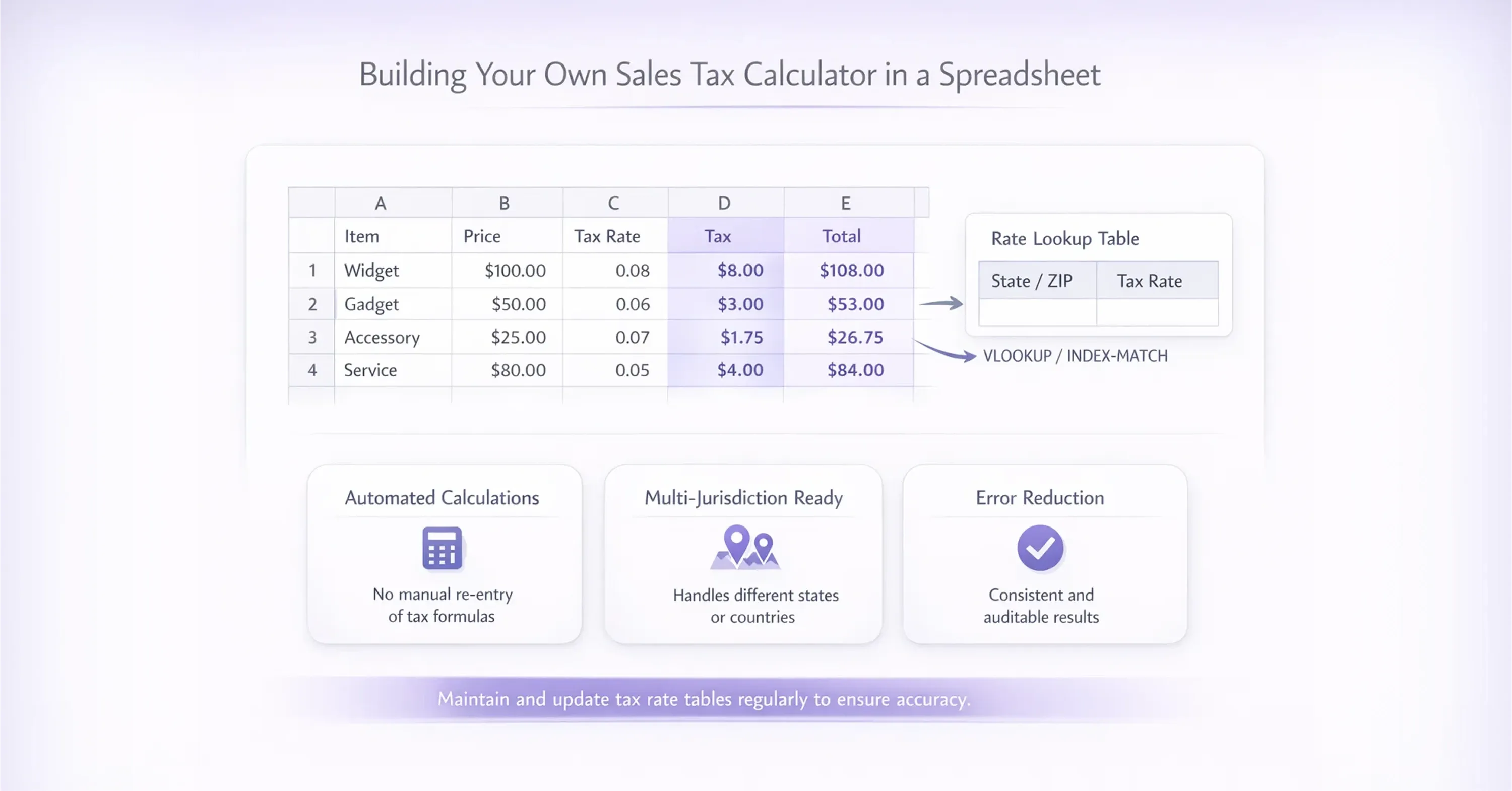
For businesses processing multiple transactions, a simple spreadsheet beats re-entering numbers into a web calculator every time.
If you're interested in designing a spreadsheet calculator with automatic rate lookups, combining formulas, and minimizing manual entry, be sure to explore the Sales and Tax Calculator: Total Price Calculation Guide.
Here's how to set up a basic sales tax addition calculator in Excel or Google Sheets:
-
Column A: Item description
-
Column B: Base price
-
Column C: Tax rate (as a decimal, e.g., 0.075)
-
Column D: Tax amount, formula: =B2*C2
-
Column E: Total price, formula: =B2+D2 or =B2*(1+C2)
Handling Multiple Tax Jurisdictions
If you sell into multiple states or countries, add a lookup table. List each jurisdiction and its rate, then use a VLOOKUP or INDEX/MATCH function to pull the correct rate automatically. This small investment in setup saves hours per week and nearly eliminates manual errors. For instance, an online seller shipping from Texas to customers in California, New York, and Florida would maintain a reference table with each state's combined rate and let the spreadsheet do the math per order line.
This kind of structured approach to sales tax addition matters even more as e-commerce grows. In the UK, revenue from internet shopping rose to almost 40% of all retail sales at points during the COVID-19 pandemic and remains above pre-2019 levels. More online transactions mean more tax calculations, across more jurisdictions, at higher volume.
When Digital Tools and Expert Help Become Essential
A spreadsheet works well for straightforward, domestic sales. But once you start selling across borders, the complexity multiplies. Different countries apply different VAT or GST rates, require registration above certain thresholds, and mandate specific filing formats.
The UK's Making Tax Digital programme illustrates this shift toward digital compliance. For businesses below the £85,000 turnover threshold, MTD for VAT raised average additional VAT revenue of £19 per business per quarter, a 2.2% increase, due to improved reporting accuracy. Above that threshold, MTD generated an average extra £57 per business per quarter, a 0.9% increase. The takeaway: better tools lead to better accuracy, which leads to fewer compliance gaps.
For marketplace sellers operating internationally, the challenge isn't just calculating the tax. It's knowing which rate applies, when to register, and how to file. If your workflow and filing needs are complex, see Sales Tax Compliance: Key Steps for Your Business for practical guidance on using compliance services and staying audit-ready.
This is where specialist providers like 1stopVAT become genuinely useful. With a team of over 40 certified tax specialists covering 100+ countries, 1stopVAT acts as a single point of contact for VAT registration, compliance, and filing, helping sellers stay compliant without becoming tax experts themselves.
From Manual Calculations to Full Compliance
One international seller operating across the EU and UK initially relied on basic calculators and spreadsheets to determine VAT. While the calculations themselves were correct, the business struggled with identifying applicable rates, registration thresholds, and filing obligations. After moving to a managed compliance setup, including VAT registration and reporting support, the company eliminated filing delays and reduced compliance risk while maintaining accurate pricing across all markets.
Recommended Add Tax Tool Options
Depending on your needs, consider these categories:
-
Free online calculators: Good for one-off calculations. Search "add sales tax calculator" and you'll find dozens of browser-based options.
-
Spreadsheet templates: Best for small businesses with predictable sales volumes and limited jurisdictions.
-
Integrated POS/e-commerce tax features: Shopify, WooCommerce, and similar platforms include built-in tax calculation that applies the right rate at checkout based on the buyer's location.
-
Dedicated VAT/GST compliance services: For cross-border sellers who need registration, rate determination, and filing handled together.
The right choice depends on your transaction volume, the number of jurisdictions you sell into, and whether you need filing support alongside calculation.
Common Mistakes to Avoid With Sales Tax Addition
Even with the right formula and tools, errors creep in. Here are the most frequent pitfalls - alongside an in-depth list of solutions and troubleshooting advice in Tax Price Calculator: Calculate Final Price with Tax:
-
Using the wrong rate: Rates change. States and countries update them, sometimes mid-year. Always verify current rates before major pricing updates.
-
Forgetting combined rates: In the US, the total rate is often a stack of state, county, and city taxes. Missing one layer means undercharging.
-
Applying tax to exempt items: Some goods, like unprocessed food or children's clothing in certain jurisdictions, are tax-exempt or taxed at a reduced rate.
-
Rounding incorrectly: Most tax authorities specify rounding rules (typically to the nearest cent). Rounding each line item individually can produce a different total than rounding a lump sum.
-
Confusing tax-inclusive and tax-exclusive pricing: In many European countries, listed prices already include VAT. Accidentally adding tax on top of a tax-inclusive price means double-charging.
Catching these mistakes early protects your margins and your customer relationships. In the UK alone, the VAT gap was 5.0% (£8.9 billion) in 2023-24, down from 7.8% the prior year. Even small per-transaction errors add up to significant figures at scale.
Conclusion
Adding sales tax to a price comes down to one reliable formula: multiply the base price by one plus the tax rate. Whether you do that mentally, in a spreadsheet, or through a dedicated add sales tax calculator, the math doesn't change. What does change is the complexity around that math, the rate that applies, the jurisdiction rules, and the filing requirements. For straightforward domestic sales, a simple calculator or spreadsheet handles the job well. For cross-border commerce, pairing calculation tools with expert compliance support keeps you accurate and compliant as you grow.
Get the formula right, verify your rates, and choose the right level of tooling for your business. That's the entire playbook for clean, confident sales tax addition.