

Overview
This article explains how a retail tax calculator works and how to use it to compute sales tax quickly and accurately. It covers the basic formulas behind tax calculation, shows how to apply the correct rate in different jurisdictions, and includes practical examples for both US sales tax and international VAT. The guide also explores how to reverse-calculate tax from tax-inclusive prices, avoid common errors, and build a more reliable workflow when selling across multiple states or countries.
What a Retail Tax Calculator Actually Does
Before jumping into formulas, it helps to understand what the tool is actually doing. A retail tax calculator is designed to quickly work out how much tax should be added to a sale based on the item price and the applicable tax rate. In its simplest form, it takes the pre-tax price and the relevant tax percentage, then returns both the tax amount and the final total owed. This makes it useful for retailers, e-commerce sellers, and anyone who needs fast, repeatable calculations without doing the math manually.
Some retail tax calculators also work in reverse, extracting the tax from a tax-inclusive price. This is especially helpful in VAT-based markets where listed prices already include tax.
The core formula is simple:
- Sales Tax Amount = Item Price × Tax Rate
- Total Price = Item Price + Sales Tax Amount
That’s the engine behind every sales tax calculator you’ll find online. The complexity isn’t in the math. It’s in knowing which rate to apply, because retail tax rates shift depending on where your buyer is located, what you’re selling, and sometimes even when the sale happens.
A quick definition worth bookmarking: a retail tax calculator is a tool or formula that computes the exact consumption tax owed on a retail purchase by multiplying the pre-tax price by the jurisdiction’s applicable tax rate.
Understanding the formula is step one. Knowing where to find the right rate is step two, and that’s where most sellers stumble.
How to Identify the Correct Retail Tax Rates
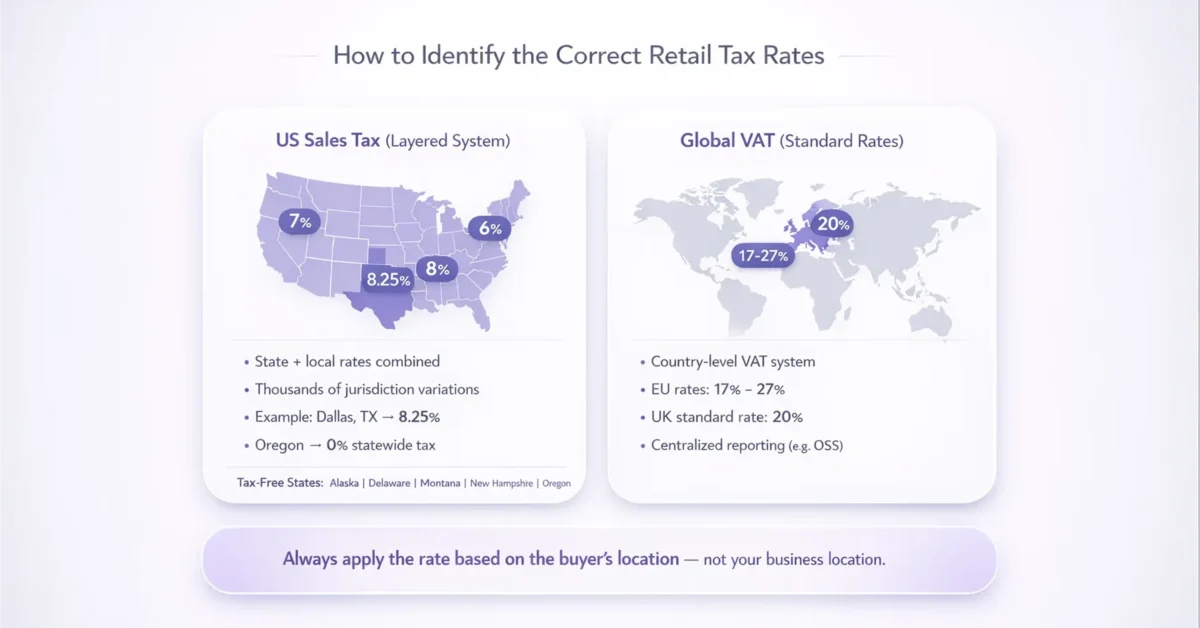
Tax rates are not universal. They vary by country, by state, and often by city or county. Choosing the wrong rate is the single most common mistake in manual tax calculations.
US Sales Tax: A Patchwork of Rates
In the United States, 45 of the 50 states impose broad-based retail sales taxes. On top of that, thousands of local jurisdictions add their own layers. A seller in Dallas, Texas, for instance, faces a combined state and local rate of 8.25%, while someone in Portland, Oregon, pays nothing at all.
Five states have no statewide sales tax:
- Alaska
- Delaware
- Montana
- New Hampshire
- Oregon
Even within those five tax-free states, some localities in Alaska still charge a local sales tax, so the details matter.
To better track US rates and their changes, see the US Sales Tax Explained: State-by-State Guide, which breaks down combined rates, sourcing rules, and compliance tips for each state and major city.
VAT Rates Outside the US
If you sell internationally, the picture gets more complex. Most countries outside the US use a Value Added Tax (VAT) system instead of a retail sales tax. In the EU, standard VAT rates range from 17% in Luxembourg to 27% in Hungary. The UK applies a standard 20% rate, and total UK VAT receipts reached £171 billion in 2024-25, a 2% increase year over year.
The key takeaway here: always verify the rate for the buyer’s location before plugging numbers into any formula. With the correct rate in hand, the actual calculation becomes straightforward.
For global sellers, Global Sales Tax Solutions & VAT Compliance Guide is a practical reference for identifying and applying the correct rates across dozens of countries (and for using automation tools to help).
Step-by-Step: How to Compute Sales Tax Using a Retail Tax Calculator
Now let’s put the formula to work. Whether you use a digital tool or a spreadsheet, these steps apply.
Step 1: Determine the Pre-Tax Price
Start with the listed price of the item before any tax is added. This is the base amount used to calculate the tax, so it needs to be correct before moving to the next step. In most US transactions, this is simple because prices are usually shown without tax and the final amount is calculated at checkout.
In many European markets, prices are often tax-inclusive. In those cases, you need to separate the pre-tax value from the total before calculating the tax correctly.
Step 2: Find the Applicable Tax Rate
Look up the combined rate for your buyer’s jurisdiction before applying the formula. For US transactions, this usually means checking not only the state rate but also any local city, county, or district taxes that may apply. For cross-border EU sales, you need to confirm the VAT rate in the destination country, since the correct rate depends on where the customer is located, not just where the seller is based.
Step 3: Multiply and Add
Here’s a real-world example. You sell a jacket for $120.00 to a customer in Chicago, Illinois. The combined state and local sales tax rate is 10.25%.
- Sales Tax = $120.00 × 0.1025 = $12.30
- Total = $120.00 + $12.30 = $132.30
That’s all it takes for a single-rate jurisdiction. Now consider a second example for an international sale. You sell the same jacket to a customer in Germany, where the standard VAT rate is 19%.
- VAT = $120.00 × 0.19 = $22.80
- Total = $120.00 + $22.80 = $142.80
Step 4: Reverse-Calculate When Needed
Sometimes you know the total but need to find the tax. This is common when prices already include VAT.
- Tax Amount = Total Price × (Tax Rate ÷ (1 + Tax Rate))
If a product in France sells for €100 inclusive of 20% VAT:
- VAT = €100 × (0.20 ÷ 1.20) = €16.67
These four steps cover the vast majority of retail tax calculations. But what happens when you’re processing dozens or hundreds of transactions across different jurisdictions?
Scaling Tax Calculations for Multi-Channel Sellers
Manual calculations work fine for a handful of orders. They fall apart when you’re selling across multiple platforms, states, or countries.
Consider a marketplace seller with customers in 15 US states and 5 EU countries. Each transaction potentially involves a different retail tax rate. Multiply that by hundreds of daily orders, and spreadsheet formulas quickly become a liability.
For a how-to approach on streamlining this, check out the Sales Tax Compliance: Key Steps for Your Business, which details preparing for multiple jurisdictions, automating calculation, and meeting deadlines.
Common Pitfalls at Scale
- Applying the seller’s local rate instead of the buyer’s destination rate
- Forgetting local surcharges that sit on top of state-level taxes
- Missing exemptions for categories like groceries, clothing, or digital goods
- Filing late because calculations took too long to reconcile
The EU’s e-commerce VAT framework illustrates how fast this space is growing. From mid-2021 through 2024, roughly €88.05 billion in VAT was declared under the EU’s OSS and IOSS schemes, with the Import OSS alone surging 62% in 2024 to €6.3 billion. That volume reflects a massive wave of cross-border retail activity, all requiring accurate tax computation.
For marketplace sellers dealing with this kind of complexity, a provider like 1stopVAT can simplify the process considerably. Their team of over 40 certified tax specialists handles VAT registration, compliance, and filing across 100+ countries, acting as a single point of contact so sellers can focus on growth instead of rate lookups.
For sellers facing state-by-state patchworks or complex remote sales rules, the US Sales Tax Explained: State-by-State Guide offers deeper context on nexus, combined rates, and filing methods in each state.
Building a Reliable Workflow
Whether you handle tax in-house or work with specialists, the workflow should follow a clear pattern:
- Capture the buyer’s location at checkout
- Match the location to the correct rate table
- Apply the formula automatically within your invoicing system
- Reconcile totals before each filing deadline
Getting this workflow right is half the battle. The other half is staying current as rates change, which they do regularly.
How to Stay Updated on Changing Retail Tax Rates
Tax rates aren’t static. States adjust them. Countries revise thresholds. The EU alone lost an estimated €89 billion in VAT revenue in 2022 due to compliance gaps, roughly 7% of theoretically expected revenues. Much of that gap comes from businesses using outdated rates or miscalculating obligations.
To keep your retail tax calculator accurate:
- Subscribe to your state’s tax authority newsletter for rate change alerts
- Monitor EU VAT rate updates through the European Commission’s portal
- Review your rate tables quarterly, especially before peak selling seasons
- Cross-reference with OECD publications for international rate benchmarks
For ongoing strategies to monitor changes and audit your compliance, consult the Global Sales Tax Solutions & VAT Compliance Guide, which covers tech tools, automation, and real-world workflow examples.
In 2024, VAT revenue accounted for 7.1% of EU GDP and 15.5% of total government revenue. Governments take these numbers seriously, and so should sellers.
Staying informed isn’t optional. It’s what separates compliant businesses from those facing penalties. For sellers expanding into new markets, working with compliance specialists like 1stopVAT ensures that rate changes don’t slip through the cracks, especially when filing obligations span multiple countries simultaneously.
Quick-Reference: Sales Tax Calculator Formulas
Here are the key formulas in one place:
- Tax on a sale: Pre-tax price × Tax rate = Tax amount
- Total with tax: Pre-tax price + Tax amount = Total
- Extract tax from inclusive price: Total ÷ (1 + Tax rate) = Pre-tax price
- Tax from inclusive price: Total − Pre-tax price = Tax amount
Bookmark these. They cover every standard retail scenario.
Conclusion
Computing sales tax is simple in theory, but accuracy depends on much more than the formula alone. The real challenge is identifying the correct rate, applying the right rules in each jurisdiction, and keeping pace with constant regulatory change. A reliable retail tax calculator helps businesses move faster, reduce manual errors, and calculate tax with greater confidence across every transaction.
For growing sellers, the goal is not just to work out tax once. It is to build a repeatable process that stays accurate as order volume, sales channels, and market reach expand. Whether you sell in one state, across the US, or internationally under VAT regimes, combining accurate tax calculation with a scalable compliance workflow is what protects revenue and supports long-term growth.
Frequently asked questions
Multiply the item’s pre-tax price by the tax rate for the buyer’s location. For example, a $50 item at a 7% rate yields $3.50 in tax, for a $53.50 total. Always use the destination rate, not your own location’s rate.
Sales tax is typically charged once at the point of final retail sale and is common in the US. VAT is collected at every stage of production and distribution, with businesses remitting only the tax on the value they add. Most countries outside the US use VAT.
Alaska, Delaware, Montana, New Hampshire, and Oregon impose no statewide sales tax. However, some localities in Alaska do charge a local sales tax, so always confirm the specific jurisdiction.
Rates can change multiple times per year. US states and localities may adjust rates at the start of any fiscal quarter. EU member states revise VAT rates less frequently but can introduce temporary reductions or new product-specific rates. Checking quarterly is a safe minimum.
Yes, as long as you input the correct VAT or GST rate for the destination country. The formula is the same. The challenge lies in identifying the right rate and meeting each country’s filing requirements, which is where specialized compliance support becomes valuable.