

What You Will Learn and Why It Matters
We start with basic places a VAT number typically appears, then move into step-by-step use of the EU VIES tool, national portals, and third-party registries. You will also see real-world examples, learn how fraudsters manipulate invalid numbers, and understand why twenty Member States can remove a VIES record if fraud is detected – a fact pulled straight from the European Commission’s Ninth report on VAT registration, collection and control procedures. Finally, we wrap up with a quick-reference featured snippet, a FAQ block for common hurdles, and a note on when firms like 1stopVAT step in.
Check the Company’s Own Documents First
Most businesses publish their VAT ID on every legally relevant document. Start here because it saves time and because self-declared numbers help you match corporate identities later.
- Purchase invoices: EU law requires suppliers to print their VAT number on invoices that exceed a minimal value.
- Sales receipts: Many point-of-sale systems insert the number near the footer.
- Company websites: Look for “Legal Notice,” “Imprint,” or “Terms and Conditions.”
- Email signatures: Professional correspondences from finance or sales staff often include the VAT ID.
A German software vendor may list “DE123456789” in their invoice header and again in the footer of their website. A quick visual check confirms both match. If the number is printed inconsistently or missing in one place, flag it for verification in the next step.
Run an Online VAT Number Lookup via the EU VIES Portal
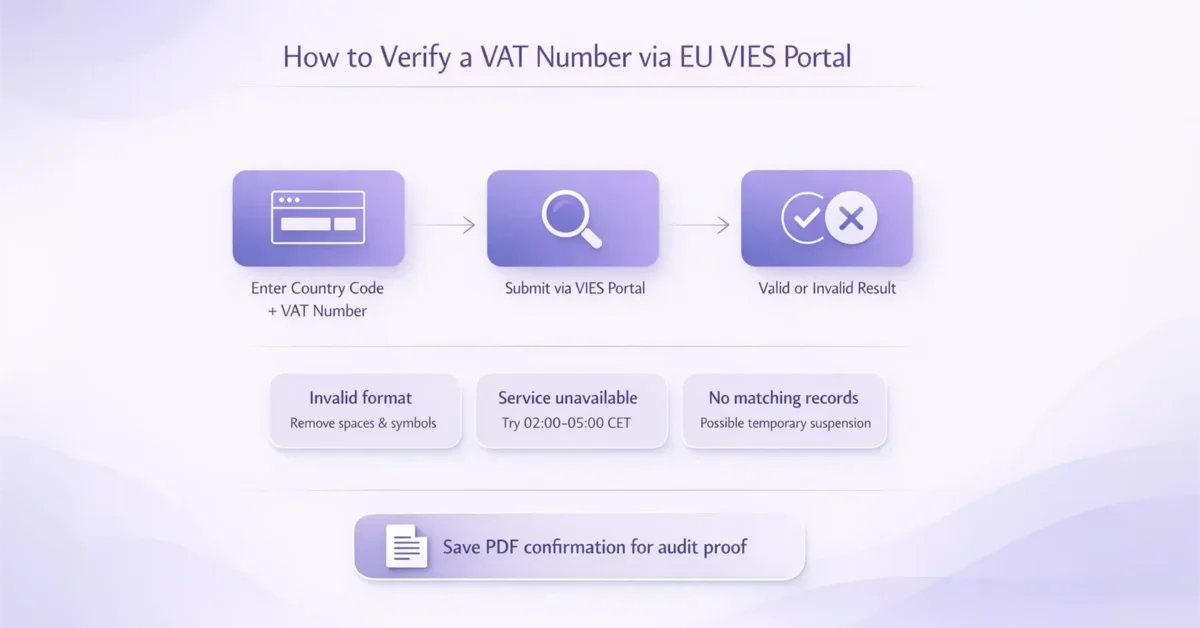
Seeing a number is not enough. You must verify it through a trusted source, and for EU-issued VAT IDs, the VIES engine is that source.
Begin: Navigate to the VIES VAT number lookup page. Enter the country code and the numeric part exactly as shown on the invoice.
The response will show either “Valid” with the registered company name and address or “Invalid” with no details.
For readers looking for a clear, step-by-step walkthrough of this process (with screenshots, error troubleshooting, and batch-check automation tips), see How to Perform an EU VAT ID Check (VIES Guide).
Troubleshooting sub-step:
Common VIES Errors and Fixes
- “Invalid format” means the ID includes spaces or symbols. Re-enter only alphanumeric characters.
- “Service unavailable” usually indicates scheduled maintenance, often 02:00–05:00 CET.
- “No matching records” can happen if the seller’s Member State has temporarily disabled the record during fraud investigation.
A VIES confirmation printout or PDF download serves as proof for tax audits. Keep it with the invoice.
Use National Tax Authority Databases When VIES Falls Short
Some EU Member States send partial or delayed updates to VIES, while non-EU jurisdictions, such as Norway or Switzerland, operate entirely separate registers. Switching to local portals can close gaps.
- France: The “Service de Recherche des Entreprises” allows a quick SIREN or VAT search.
- Spain: The Agencia Tributaria’s “Censo de empresarios” database reveals real-time status.
- United Kingdom: After Brexit, use the UK Government “Check a VAT registered business” tool for GB numbers.
- Norway: Brønnøysund Register Centre provides public VAT listings.
For a deeper dive into this process (and how to document your findings), see VAT Certificate Verification: Ensuring Compliance.
Example: A British supplier presents “GB999 9999 73.” VIES returns “Invalid,” but the UK portal shows it as active. That confirms the post-Brexit divergence.
Always capture screenshots or PDFs; they may be your only evidence if a national site updates overnight.
Broaden the VAT ID Search Beyond Government Sites
If both VIES and national databases are down or inconclusive, commercial registries and industry directories can help you triangulate information.
- European Business Register (EBR) gives access to 15+ national company filings.
- Chamber of Commerce websites often publish members’ tax IDs.
- Reliable tax compliance firms aggregate real-time data feeds. For instance, 1stopVAT’s consultancy teams maintain in-house validation tools that mirror official sources across 100+ countries, adding a human check when government APIs fail.
To help you compare the options and find the best technology or consultancy partner, see Best Services for VAT Vendor Search: Find Reliable Suppliers.
A third-party source never replaces an official confirmation, but it can tell you whether a typo or recent registration is the reason for a mismatch.
Watch for Red Flags and Fraud Indicators
With cross-border VAT fraud costing EU coffers 9.5% of total VAT liability in 2023 as reported in the Commission’s VAT Gap Report 2025, vigilance is not optional.
Key warning signs:
- The business name returned by VIES differs from the trading name on the invoice.
- The number switches between valid and invalid on different days.
- Requests to pay to a bank account in a third country.
If you discover any red flag, document it and inform your internal tax team immediately. Persistent doubts warrant a call to the supplier’s domestic tax office.
For further advice on identifying and preventing fraud, consult VAT Compliance & Consultancy: Why Expert Advice Matters.
Once you have a number that passes the basic checks, the next step is to log and store your evidence.
Document Your Findings for Audit-Readiness
Tax inspectors value consistent records, not heroic memory feats. A simple file structure does the job.
- Create a folder named after the supplier or customer.
- Add sub-folders: “Invoice,” “VIES check,” “National check,” “Email correspondence.”
- Save files in PDF, not screenshots only, because PDFs retain metadata.
- Use consistent file names like “2025-02-15_VIES_OK_DE123456789.pdf.”
Best documentation practices and more on keeping records audit-ready are detailed in VAT Reporting Made Simple: Best Practices for Businesses.
A Dutch import company keeps its evidence on SharePoint. When the auditor asks for the June 2024 checks, the finance manager retrieves the packet in under two minutes and avoids a potential fine. Good documentation also supports reclaiming input VAT faster.
Know When to Call in Professional Help
Occasionally, even diligent in-house teams face complex supply chains: multiple drop-ships, fiscal representatives, or parallel VAT registrations. In these scenarios, partnering with a specialist offers peace of mind.
That is where firms like 1stopVAT can step in. Acting as a single point of contact, their 40+ certified tax specialists combine automated tools with manual reviews, ensuring your cross-border VAT obligations stay bulletproof while you focus on growth.
If you want to understand how to evaluate, select, or engage with top advisory firms, see Top Advisory Firms for VAT Calculation: Ensure Accurate Tax.
Before you outsource, gather all the documents you created in Steps 1-6. They will speed up onboarding and lower advisory fees.
External help is not a shortcut but a force multiplier when internal bandwidth runs thin.
Quick Ways to Find a VAT Number
To find a company’s VAT number fast, start with its invoice or website imprint. If the number is not there or you need verification, run a VAT number lookup on the EU VIES portal, then check the relevant national tax database for confirmation. Always save a PDF of the validation result to satisfy future audits.
Conclusion
Finding and verifying a VAT number is a straightforward, repeatable process: start with the supplier’s own documents, confirm through VIES or national portals, cross-reference third-party sources, watch for fraud signs, and document every step. Given that VAT revenues now average 7.0% of GDP across OECD countries as shown in the OECD Consumption Tax Trends 2024, governments are watching compliance more closely than ever. With the steps in this guide – and expert backup when needed – you will meet that scrutiny confidently and keep your transactions moving.
Frequently asked questions
No. Only companies exceeding the local VAT registration threshold or engaging in cross-border B2B sales must obtain a VAT ID.
Yes. Twenty Member States may deactivate a number if fraud is suspected, a fact highlighted in the European Commission’s Ninth report on VAT registration procedures. Regular checks protect your input-tax claims.
Best practice is once per quarter or before every high-value transaction, whichever comes first.
No. Post-Brexit GB numbers need to be verified through the UK Government’s “Check a VAT registered business” service.
Treat it as a red flag, withhold payment until you receive the number, and run an independent validation through available public records.