

What you will learn
Over the next few minutes you will discover:
- When UK law requires you to register and when voluntary registration makes sense
- The documents HMRC asks for and the questions you will face inside the new VAT registration portal
- A click-by-click walkthrough of the digital VAT application, including screenshots you can easily visualise
- Common mistakes that led to 17% of applications being rejected last year and how to avoid them
- Tips to cut waiting time and what to do after you receive your VAT number
By the end, you will have a clear action list and the confidence to complete the application in one sitting. To register for VAT online, sign in to the HMRC VAT Registration Service with your Government Gateway ID, complete the five-page digital form (business details, turnover, bank, responsible officers, declarations), upload proof of ID and bank account, then submit. HMRC reviews the file and issues a VAT registration number by email or post, usually within 10 working days.
Step 1: Confirm you need to register
More than 234,000 UK businesses took this step in the last financial year, lifting the total to 2,285,900 live VAT traders. The trigger is simple: if your UK taxable turnover exceeds £90,000 in any rolling 12-month window, registration is compulsory.
- Monitor turnover monthly. Keep a running total so the moment you pass the threshold you can register within 30 days.
- Consider voluntary registration below the threshold if you sell B2B or plan large input VAT claims.
- Overseas sellers shipping to UK consumers via Amazon FBA must register from the first sale.
Once you decide registration is required or beneficial, move on quickly because penalties can apply from the date you should have registered.
The threshold discussion naturally brings you to the next question: what documents prove your turnover and identity?
Step 2: Gather the required documents
Before you log in to the VAT registration portal, collect everything HMRC will ask for. Having digital copies at hand speeds up the form and avoids later requests for more information.
Typical evidence:
- Certificate of incorporation or partnership agreement
- Latest set of accounts or management P&L
- Bank statement in the business name (PDF is fine)
- Proof of address for the responsible officer, e.g., a utility bill
- Passport or driving licence scans for directors
If you trade on marketplaces, download seller reports showing UK sales. HMRC may also request contracts or invoices supporting the turnover figure.
Many applicants stall here, rummaging for paperwork while the session timer ticks down. Spend ten minutes upfront and spare yourself the stress.
With a tidy document folder, you are ready to open the online service. For detailed advice on efficient document management throughout VAT registration, review How to Register for VAT: A Complete Guide.
Step 3: Create or access your Government Gateway account
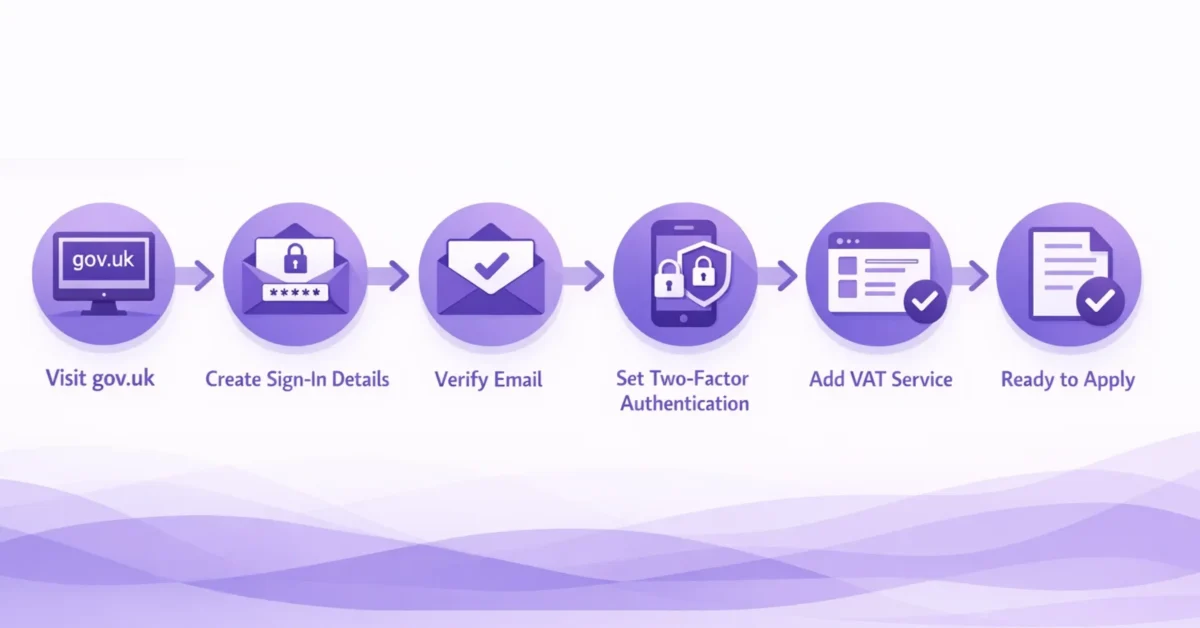
Every digital VAT application starts on the Government Gateway. If you have filed PAYE or Corporation Tax online, you already have credentials. If not:
- Visit gov.uk and choose “Create sign-in details”.
- Enter an email address, verification code, and a password.
- Note the User ID shown on screen and sent by email.
- Add two-factor authentication via text or authenticator app.
Sign in again and add the “VAT” service to your account. You will see “Register for VAT” appear in the hub menu.
A short pause here pays dividends. Make sure the email, phone, and business address on the account match the documents you prepared. Inconsistent data is one of the top reasons applications fall into manual review.
Now you are set to open the application itself.
Step 4: Complete the digital VAT application
HMRC replaced the legacy form VAT1 with the sleek VAT Registration Service. The portal guides you through five screens. Let us walk through each.
1. Business details
You will enter:
- Legal entity type, trading name, registration number
- Principal place of business address
- Description of activities in plain English (avoid jargon)
Real-world example: A Glasgow craft-beer microbrewery wrote “Manufacture and wholesale of beer. Direct online sales to UK consumers.” The application sailed through in a week.
2. Turnover and start date
State your rolling 12-month taxable turnover and the date you crossed the threshold or the voluntary effective date you want. If turnover fluctuates, upload a spreadsheet summary.
3. Bank details
Provide sort code, account number, and the name exactly as on the statement. Upload the PDF statement you prepared.
4. Responsible persons
List directors or partners with their NI, date of birth, and home address. Upload ID scans. For non-resident owners, passport and proof of overseas address are acceptable.
5. Declarations
Tick to confirm the information is correct, enter your name and capacity (director, partner, agent), then hit Submit.
Before you exit, download the submission receipt in case HMRC emails land in spam.
Applicants often ask, “What happens behind the scenes now?” Let us lift the curtain.
Step 5: Track your application and avoid common mistakes
HMRC’s backend runs automated checks on identity, bank account ownership, and turnover consistency. If anything triggers a flag, a caseworker looks at the file. This manual review is why 53,000 out of 314,000 applications were unsuccessful, or 17%, last year.
Avoid these pitfalls:
- Mismatched names between the bank account and Companies House
- Vague business activity descriptions like “consultancy” without detail
- Failure to upload supporting documents
- Choosing a future effective date without explanation
For a dedicated guide to the main VAT registration pitfalls, don’t miss The obligation to register for VAT: 6 common mistakes.
You can monitor progress by logging back into the portal. Statuses change from “Received” to “Processing” to “VAT number issued”. HMRC also emails updates, so white-list their domain.
If HMRC requests more information (an “information notice”), respond within 14 days. Late replies reset the review clock.
An external VAT compliance firm such as 1stopVAT, which acts as a single point of contact across 100+ countries, can step in here, gather clarifications, and speed up the dialogue with HMRC. For high-volume or multi-country applications, consider Fast-Track VAT Registration: How to Register Quickly and Easily.
Once the status reads “VAT registration certificate issued”, you can celebrate but do not rest yet.
Step 6: After approval – what comes next?
Your VAT number arrives by email or post and appears in your Government Gateway within 48 hours. Follow these steps immediately:
- Update invoices to show the VAT number and correct rate
- Configure accounting software to start charging VAT from the effective date
- Register for Making Tax Digital (MTD) VAT returns if turnover exceeds £90,000
- Inform marketplaces like Amazon or eBay of the VAT number to prevent listing suspension
- File the first VAT return even if it covers only one day
For actionable advice on digital VAT filings and record-keeping, visit How to File VAT Returns Online: Streamlining Digital Submission.
Remember to keep digital records for six years. Many businesses also plan next steps for international sales. EU sellers now rely heavily on the One Stop Shop, which collected €33 billion of VAT during 2024 under the new e-commerce rules. If you expand abroad, consider OSS or IOSS registration early.
With your VAT number live, you have closed the compliance gap. Let us summarise the journey.
Recap: The online VAT registration journey in eight lines
- Check if your turnover passes the £90k threshold or choose voluntary registration.
- Collect company, ID, and bank documents in digital form.
- Log in or create a Government Gateway account and add “VAT”.
- Complete the five-screen digital VAT application clearly and honestly.
- Upload supporting files to avoid manual review delays.
- Track status in the portal and reply fast to any HMRC queries.
- Receive your VAT certificate and update invoices, software, and marketplaces.
- Meet ongoing obligations, including MTD filing and record keeping.
Conclusion
Digital VAT registration sounds daunting, yet it is essentially a short online form backed by solid evidence. By collecting documents first, answering questions precisely, and following up quickly, you sidestep the bottlenecks that tripped up 17% of filers last year. The result is a VAT number in days, not weeks, and the peace of mind that your business is trading fully compliant. If you later expand across borders, partners like 1stopVAT can shoulder the extra registrations so you stay focused on growth. For more ongoing compliance and best practices across jurisdictions, consult VAT Filing & Returns: A Complete Guide for Businesses.
Frequently asked questions
Most straightforward applications are approved within 10 working days, but a manual review or missing documents can stretch the timeline to 30 days.
Yes. You can select an effective date up to four years in the past if you have been trading and need to account for VAT retrospectively. HMRC may ask for old invoices and accounts to validate the date.
Log back in to the VAT Registration Service and use the “amend application” link while the status is still “Processing”. If the VAT number has already been issued, you will need to write to HMRC explaining the correction.
They can, provided they first obtain a UK Government Gateway ID. Alternatively, they may appoint a UK VAT agent who submits on their behalf.
No. The EU One Stop Shop is optional and applies only to EU distance sales. If your business dispatches goods from the UK to EU consumers, you may need to set up an IOSS or appoint an EU intermediary.