Why Calculating Sales Tax in Bulk Matters
Most businesses don't sell in a single tax jurisdiction. If you're shipping products across U.S. states, selling through multiple online marketplaces, or operating internationally, each transaction can carry a different tax rate. Doing this one at a time is where mistakes happen.
The math is straightforward, but the volume is the problem. A mid-size e-commerce seller might generate 2,000 orders a week across 15 states. Each state has its own base rate, and many have county or city-level additions. Manually checking each one is unrealistic.
That's why batch tax calculation exists as a concept and a workflow. It lets you:
-
Process all transactions for a given period in a single pass
-
Apply jurisdiction-specific rates automatically using lookup formulas or tax engines
-
Catch errors before they reach a filing
-
Free your team to focus on review rather than data entry
The financial case for automation in this space is well documented. A Forrester Consulting study found that an automated indirect tax solution produced $3.8 million in benefits against $1.7 million in costs over three years, a 120% ROI. And those gains came primarily from reduced errors and time savings.
Getting the foundation right is the first step, so let's start with how to prepare your data.
Structure Your Transaction Data Correctly
Before you can calculate anything in bulk, your data needs to be clean and consistent. A mass sales tax calculator is only as reliable as the information you feed it.
Start by organizing your transaction records into a standardized format. Whether you're exporting from Shopify, Amazon, or your own ERP, you'll want these columns at a minimum:
-
Transaction ID: unique identifier for each sale
-
Date: when the transaction occurred
-
Ship-to state/county/city: the destination that determines tax jurisdiction
-
Product category: some items are tax-exempt or taxed at reduced rates
-
Sale amount: the taxable base before tax
-
Tax rate: to be filled via lookup
-
Tax amount: calculated from rate × sale amount
Handling Missing or Inconsistent Data
Real-world exports are messy. You'll encounter blank ZIP codes, misspelled city names, and product descriptions that don't match your tax categories. Before running any bulk calculation, scrub your data:
-
Normalize all location fields (e.g., "NY" vs. "New York" vs. "new york")
-
Fill in missing ZIP codes using order records or customer databases
-
Map each product to a tax category code (clothing, food, digital goods, etc.)
A seller on Amazon, for instance, might export 5,000 orders and find that 8% have incomplete address data. Fixing those before calculation prevents cascading errors in your tax totals. In practice, this data cleanup step takes longer than the calculation itself. Businesses consistently underestimate it until they've missed a filing deadline because of it.
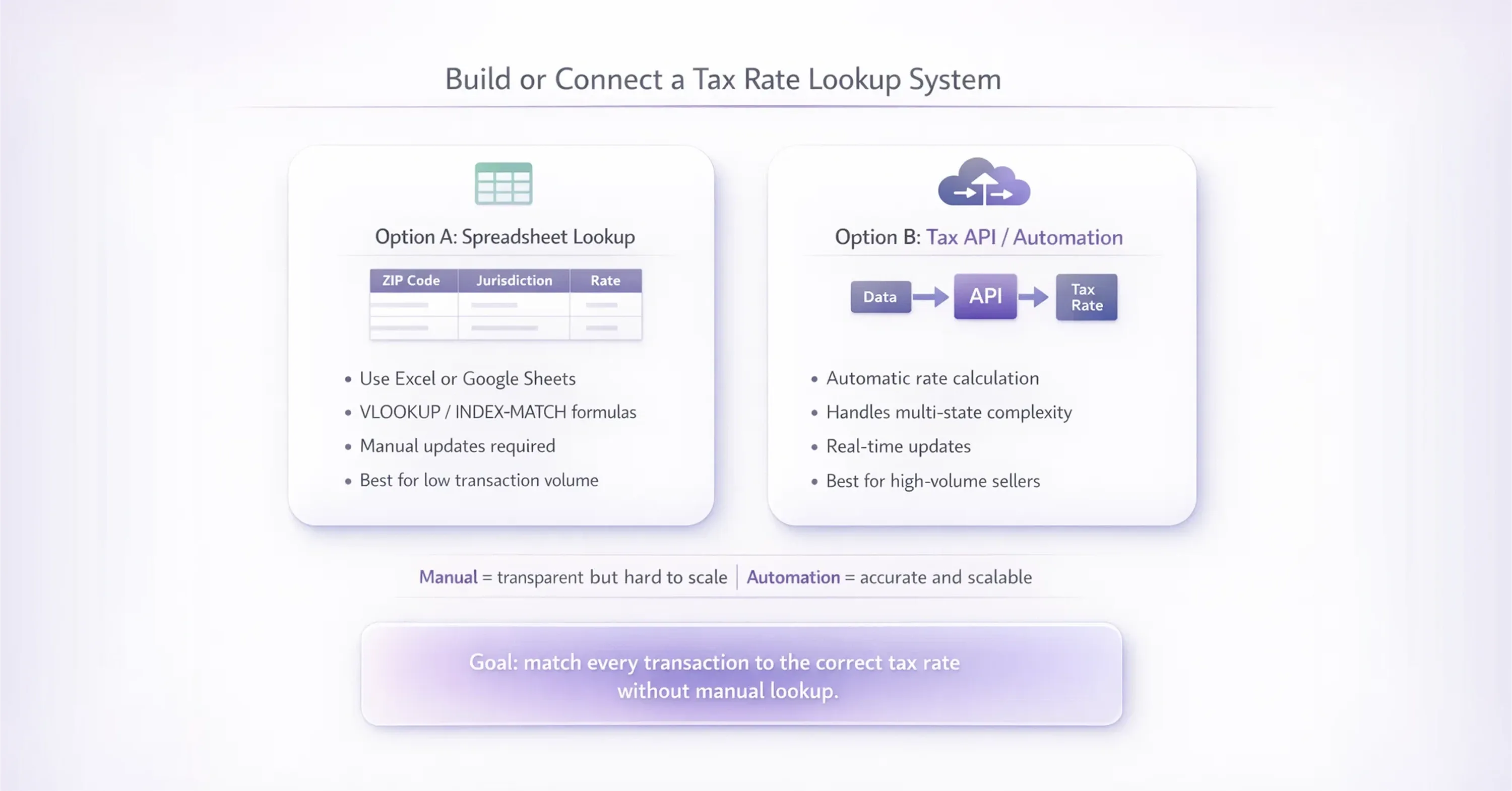
Build or Connect a Tax Rate Lookup System

The core of any mass sales tax calculator is the rate lookup. You need a way to match each transaction's destination to the correct combined tax rate (state + county + city + special district, in many U.S. jurisdictions).
There are two main approaches, and the right one depends on your volume and complexity.
Option A: Spreadsheet-Based Lookup
For smaller operations (under a few thousand transactions per period), a well-built spreadsheet works. Here's how:
-
Download a current sales tax rate table from your state's Department of Revenue or a public tax data source
-
Create a lookup sheet in Excel or Google Sheets with columns for ZIP code, jurisdiction name, and combined rate
-
Use VLOOKUP or INDEX/MATCH formulas to pull the correct rate into your transaction sheet based on ZIP code
-
Multiply the sale amount by the looked-up rate to get tax owed
This method is transparent and easy to audit. But it has limits. Rate tables change quarterly in many states, so you need a process to refresh them. And if you sell in dozens of states, maintaining all those tables gets heavy. This is one of the most common avoidable mistakes we encounter - a spreadsheet that was built carefully and then never updated.
Option B: Tax Calculation APIs and Tools
For higher volume or multi-state sellers, connecting to a tax calculation API is more practical. These tools accept a batch of transactions (often via CSV upload or direct API call) and return the correct tax for each line.
The accuracy gains are significant. The same Forrester study found that invoice tax error rates fell from 3% to below 1% with automation, translating into $2.6 million in savings over three years for the composite enterprise studied.
If you want deeper insight into the practical challenges of tax rate lookups - including how rates are stacked across state, county, and city layers, and how to confirm accuracy - visit the US Sales Tax Explained: State-by-State Guide.
Whichever approach you choose, the goal is the same: every transaction gets matched to the right rate without someone manually looking it up. Now, let's talk about running the actual calculation.
Run the Batch Tax Calculation
With your data clean and your rate source connected, the calculation itself is the simplest part. But there are a few things to get right.
If you're using a spreadsheet, add a "Calculated Tax" column that multiplies each row's sale amount by its looked-up rate. Then add a validation column that flags any row where the rate is zero, blank, or unusually high. This catches lookup failures before they reach your totals.
-
For each transaction: Tax = Sale Amount × Combined Tax Rate
-
Flag rows where tax rate = 0 or > 15% for manual review
-
Sum tax by jurisdiction for filing-ready totals
-
Cross-check totals against your platform's built-in tax reports
For example, a business selling home goods across Texas, California, and Florida would run one batch per filing period, grouping the output by state. California's combined rates can exceed 10% in some cities, while certain Texas jurisdictions sit closer to 6.25%. If your batch output shows a flat rate across all California transactions, something's wrong with your lookup. We've reviewed output files where every California transaction carried the state base rate and nothing else. The seller had no idea their city-level lookup wasn't firing.
For practical tips and workflow examples on avoiding common calculation mistakes and handling mixed-taxability invoices, check Figuring Sales Tax: How to Calculate Correctly.
Handling Exemptions and Special Cases
Not every sale is taxable. Your bulk calculation needs to account for:
-
Tax-exempt customers (resellers with valid exemption certificates)
-
Product-level exemptions (groceries in some states, clothing in others)
-
Threshold-based rules (some states exempt sales below a certain dollar amount)
Build these into your spreadsheet as conditional logic, or configure them in your tax tool's settings. Skipping this step is one of the most common sources of overpayment.
With your calculations done and validated, the next step is making sure those numbers actually make it into your tax filings accurately.
Reconcile and Prepare for Filing
Running a mass sales tax calculator isn't the finish line. You need to reconcile your calculated totals against what your sales platforms report and then format the output for each jurisdiction's filing requirements.
Start by comparing your batch totals to the tax collected figures in your marketplace dashboards. Small discrepancies (under 1%) often come from rounding differences. Larger gaps point to missing transactions, rate mismatches, or exempt sales that weren't flagged.
-
Export platform tax reports for the same period
-
Compare total tax collected vs. total tax calculated, by state
-
Investigate any variance greater than 1%
-
Document adjustments for audit readiness
Sellers who document their reconciliation process consistently fare better in audits - not because their numbers were perfect, but because they could explain every variance.
Firms using cloud-based tax engines saw their compliance team workload drop by roughly 50%, yielding annual savings of $493.8K for compliance teams alone. Even if you're not at enterprise scale, the principle holds: automating the calculation frees your team to focus on review and filing rather than number-crunching.
For marketplace sellers who also sell internationally, the complexity multiplies further. VAT obligations across the EU, UK, and other regions require separate calculations and filings. In fact, EU tax authorities reported €33.1 billion of VAT declared through One-Stop-Shop schemes in 2024, up 26% from the prior year, and more than 170,000 businesses had registered under these EU VAT schemes by end-2024. For sellers navigating both U.S. sales tax and international VAT, a provider like 1stopVAT can handle cross-border VAT registration, compliance, and filing across 100+ countries, giving marketplace sellers a single point of contact backed by 40+ certified tax specialists.
Build a Repeatable Process
The real value of a bulk sales tax workflow isn't a one-time calculation. It's a repeatable process that runs every filing period with minimal friction.
Document your steps: where you pull transaction data, how you clean it, which lookup source you use, how you validate, and where you store the final output. If someone else on your team needs to run the process, they should be able to follow it without guessing.
-
Set calendar reminders for rate table updates (quarterly at minimum)
-
Automate data exports from your sales platforms where possible
-
Keep a log of exemptions and adjustments for audit purposes
-
Review your process annually as you expand into new states or channels
For a full checklist on streamlining digital submissions, automating your process, and eliminating common VAT and sales tax pitfalls, see VAT Reporting Made Simple: Best Practices for Businesses.
In the UK, 45% of VAT-registered businesses reported that Making Tax Digital software saved them time, with average savings of 26 to 40 hours per business per year. The lesson applies on both sides of the Atlantic: investing in a structured, repeatable tax workflow pays for itself quickly.
Conclusion
Bulk sales tax at scale doesn't get simpler - it gets more manageable when the right system is in place. The businesses that handle it well aren't doing less work. They've structured the work so it happens in the right order, with the right checks, on a schedule that doesn't catch anyone off guard.
Clean data. Accurate rate lookup. Validation before totals. Reconciliation before filing. Documentation that holds up under scrutiny. Get those five things right and bulk sales tax stops being a recurring liability and starts being a routine your team runs without drama. If your transaction volume or geographic footprint has grown to the point where a spreadsheet is no longer enough, that's the right time to look at dedicated tools - or a partner like 1stopVAT that handles both U.S. and international obligations in one place.