

What You’ll Learn
This guide walks through five practical steps:
- Checking eligibility under the goods and services tax registration rules
- Compiling documents now so you are not hunting for PDFs later
- Completing the online GST application, screen by screen
- Tracking approval timelines and common follow-up requests
- Leveraging ongoing GST compliance to unlock faster growth and fewer tax headaches
We will also sprinkle in real statistics and expert tips, plus a quick look at how a specialist such as 1stopVAT can shoulder multi-country tax obligations while you focus on sales.
Step 1: Confirm Whether You Must Register for GST
Before filling in any forms, be sure registration is mandatory. Most jurisdictions trigger compulsory GST registration based on turnover thresholds, type of supplies, or a non-resident status.
- In India, businesses crossing ₹40 lakh (₹20 lakh for services) must register.
- In Australia, the threshold is AUD 75,000 per annum.
- Digital service providers often face a zero-threshold rule, meaning one sale can create an obligation.
Digital merchants selling into the European Union should note the momentum behind VAT reforms. Member States collected over €33 billion via the EU’s e-commerce VAT systems in 2024, a clear sign that tax authorities monitor cross-border sellers closely.
For a practical international perspective, see the Sales Tax Registration and Compliance Guide for Global Sellers, which outlines common triggers in the EU, US, Canada, and Australia.
Missing mandatory registration can trigger:
- Back-dated tax assessments
- Penalties and interest
- Port suspensions for importers
Takeaway: Check the latest threshold in every market you sell to, then move to the next step if you are liable.
Step 2: Gather the Required Documents
The fastest way to finish any online form is to have your paperwork ready. Most GST registration services and government portals will ask for the following:
Identity and business proof
- PAN card or national tax ID
- Certificate of incorporation or partnership deed
- Director or proprietor ID (passport, driver’s licence)
Address proof
- Recent utility bill (within 90 days)
- Lease agreement or property tax receipt
- Virtual office agreement for e-commerce sellers without a local warehouse
Banking details
- Cancelled cheque bearing the business name
- Bank statement or a confirmation letter from the branch
Optional but useful
- Digital signature certificate (DSC)
- Letter of authorisation for third-party representatives
Why does document organization matter? As detailed in the How to File VAT Returns Online: Streamlining Digital Submission, setting up consistent naming and document storage can avoid common mistakes and reduce errors during both registration and returns.
Keep scans in PDF or JPEG format, under the file size limit stated on the portal. Rename files logically, for example, “Company-PAN.pdf”, to save time during uploads.
Spending 30 minutes on document prep can shave days off the registration cycle because you will not receive repeated deficiency notices from the tax office.
Step 3: Create Your Account on the GST Portal
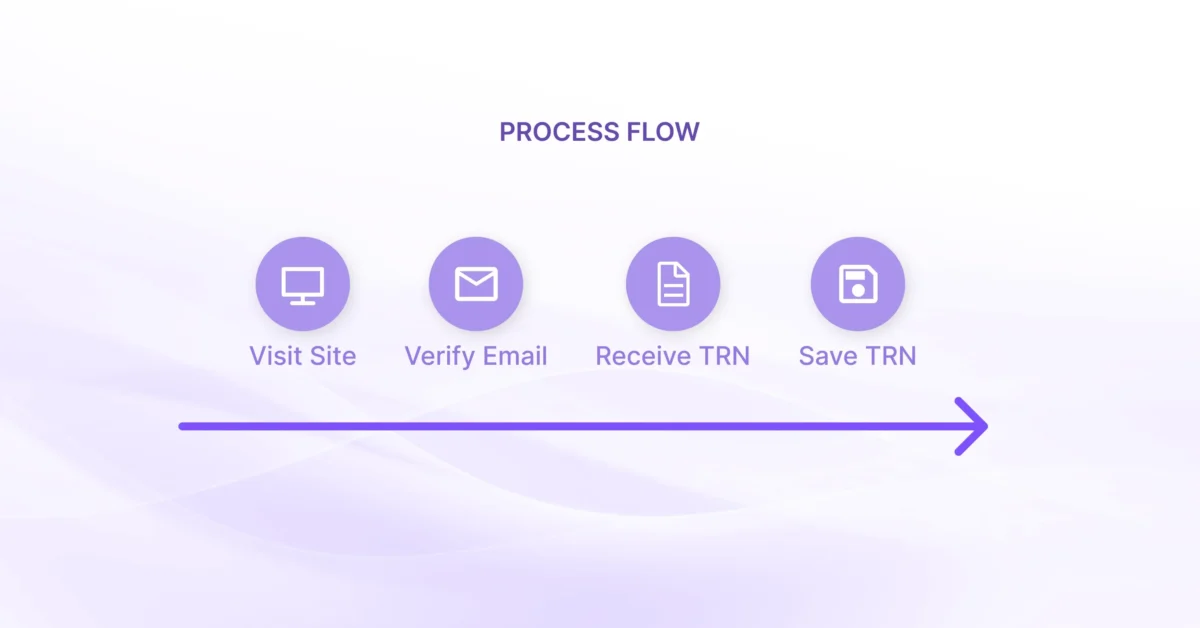
Most jurisdictions provide a dedicated GST portal. You will need to:
- Visit the official site.
- Select “New Registration” or equivalent.
- Enter a valid email and mobile number and verify with an OTP (one-time password).
- Receive a temporary reference number (TRN) that lets you pause and resume the application.
If you are registering in multiple countries, consider using a single point of contact. A consultancy like 1stopVAT, staffed by 40+ certified tax specialists, can sync registrations across 100+ jurisdictions so you avoid juggling different login credentials.
For more guidance on managing tax compliance internationally, explore Global Sales Tax Solutions & VAT Compliance Guide.
Ending note: Write down your TRN or store it in a password manager; you will need it for the next stage.
Step 4: Complete the GST Application Form
With an active TRN, log in and follow the on-screen sections. Portal names vary, but they usually cover:
Business details
Enter legal name, trade name, date of commencement, and primary place of business. If you are an online-only seller, many portals let you select “no fixed establishment”.
Goods and services classification
Use the appropriate HSN/SAC codes to describe your supplies. Misclassification can lead to the wrong tax rate.
Director or owner information
Upload identity documents, photos, and personal tax IDs. Double-check spellings; mismatches with government records slow approvals.
Bank and financial details
Provide account numbers and IFSC/SWIFT codes. Portal systems often verify these against national databases, so accuracy matters.
Document uploads
- Drag-and-drop files into their respective slots.
- Use the “preview” tool to confirm legibility.
- Delete accidental duplicates before submission.
Final verification
Tick the declaration box, then verify the application:
- Proprietors: E-sign with an Aadhaar-based OTP or similar.
- Companies/LLPs: Use a digital signature certificate (DSC).
Submit, and you will receive an Application Reference Number (ARN). Save or print the acknowledgment.
For registration guidance tailored to digital businesses or non-resident vendors, review Singapore – GST Registration for Overseas Vendors.
Concluding tip: Many applications bounce back due to unclear scans. If you see a 150-dpi option on your scanner, pick 300 dpi instead for crisper images without breaching file limits.
Step 5: Track Application Status and Respond Promptly
Approval timelines range from 1 day to 14 days, depending on the jurisdiction.
Check status daily:
- Login to the portal and select “Track Application”.
- Look for colour codes: green (approved), orange (pending clarification), red (rejected).
- Download the show-cause notice if clarification is required.
Common queries involve:
- Proof of business address
- Director authorisation
- Discrepancies in bank details
Respond within the stipulated window, usually seven days. Failure to respond can lead to automatic rejection, forcing you to start from scratch.
Once approved, download your GST registration certificate. Display it at your place of business or on your website footer, as mandated.
For expert tips on expediting and tracking your VAT/GST application, consult the Expedited VAT Registration: Checklist for Fast EU Entry. Quick replies keep your application alive. Set calendar reminders until the certificate arrives.
Why Consistent GST Compliance Matters
Registering is only the first hurdle.
Ongoing GST compliance involves:
- Issuing tax-compliant invoices with correct GST numbers
- Filing monthly or quarterly returns on time
- Reconciling sales and purchase data to claim input tax credits
- Maintaining digital records for the statutory retention period
Member States in the EU alone have processed nearly €88 billion in VAT under OSS and IOSS schemes since 2021. The takeaway? Authorities keep a close eye on filings, and gaps are spotted quickly.
Digital businesses using marketplaces or direct-to-consumer funnels should also register for schemes such as the EU’s One Stop Shop (OSS). More than 170,000 businesses had signed up for OSS and IOSS by the end of 2024, simplifying multi-country returns into one quarterly filing.
If multi-jurisdiction compliance feels heavy, lean on a GST/VAT consultancy. Firms like 1stopVAT act as a single contact point, handle filings across borders, and update you on rule changes so you stay focused on growth. To dive deeper into consultancy benefits, read VAT Consulting for International Businesses.
Concluding note: Staying compliant keeps cash flow healthy, avoids penalties, and builds trust with customers and partners.
GST Registration in Five Clicks
- Check if your turnover or digital sales trigger mandatory GST registration.
- Scan and label identity, address, and bank documents.
- Create an account on the official GST portal and store your TRN.
- Fill the online form, choose accurate HSN/SAC codes, and e-sign.
- Monitor status daily, respond to notices, then download and display your certificate.
Conclusion
GST registration might look daunting, yet when broken into these five steps – eligibility check, document prep, portal setup, form completion, and status tracking – the process becomes manageable. Completing registration on time not only keeps you on the right side of the law but also unlocks input tax credits and smooth international expansion. Stay alert to filing deadlines, and when cross-border complexity grows, consider partnering with a specialist so your business can scale without tax friction.
Frequently asked questions
Thresholds differ by country. In India it is ₹40 lakh for goods and ₹20 lakh for services, while Australia sets the bar at AUD 75,000. Always check the latest local limit before relying on any figure.
Yes. Most jurisdictions let non-resident suppliers register by appointing a tax representative or using their overseas address. However, some countries require a local fiscal representative, so verify the rule for each market.
Average processing time is 1 to 14 days. Providing clear scans and accurate data speeds up approval, while missing documents can extend the timeline through additional queries.
Companies and LLPs generally must use a DSC, whereas sole proprietors can often verify with an OTP sent to their Aadhaar-linked mobile number or similar ID.
Late registration can trigger back-dated tax demands, interest, and penalties. Authorities may also block your ability to issue tax invoices or import goods until you comply.