

What You’ll Learn
- See why a calculator beats mental arithmetic, backed by eye-opening EU and UK figures.
- Follow a five-step walkthrough that compares manual math with an online VAT calculator.
- Explore real-world business cases where a VAT return calculator shields cash flow.
- Avoid typical mistakes and turn to expert VAT advisory.
Let’s start big!
Why a VAT tax calculator matters
Because of VAT leakage, EU member states missed out on €89.3 billion in 2022 VAT revenue, about 7 % of the tax they expected to collect. In its turn, the UK collected a staggering £168 billion in 2023–24, which proves that authorities have no problem billing you correctly.
Businesses are craving speed and accuracy:
- Manual errors trigger audits, fines, and delayed refunds.
- Rate tables shift constantly, with multiple reduced or special rates per country.
- Digital reporting rules, like Making Tax Digital, ensure clean returns: 45% of companies that adopted compliant software saved up to 40 hours a year.
A VAT tax calculator turns complex rules into a push-button solution.
A VAT tax calculator is an online or desktop tool that applies the correct VAT percentage to a net or gross price, instantly showing the tax amount and total invoice value so businesses can bill customers and record transactions accurately.
Five steps: manual math vs using an online VAT calculator
Accurate VAT calculation – whether adding tax to a net price or extracting it from a gross total – is vital for compliant invoices. Manual math is slow and error-prone, while modern online VAT calculators deliver instant, precise results.
Step 1: Gather clean data
- Net price, currency, and supply date
- Customer location and VAT status (B2B vs B2C, intra-EU vs domestic)
- Any exemption documents.
Gathering clean data is vital because the entire accuracy and legality of the VAT calculation rests on the quality of the initial inputs. Using the wrong net price, an outdated supply date, or an incorrect VAT status will result in either over- or under-charging the customer and could lead to non-compliance with tax laws, resulting in fines or audits.
Step 2: Identify the correct rate
This is the crucial step of determining the specific VAT percentage that applies to the transaction based on the product, service, customer’s status, and the rules of the governing jurisdiction.
Manual route:
- Scan the official tax authority table
- Pick standard, reduced, super-reduced, or zero rate.
Online VAT calculator route:
- Select the country from a drop-down
- The current standard rate auto-loads, but remember: calculators usually display the main rate only. Many nations run several non-standard categories that change often.
Step 3: Do the math right
Once the clean data is gathered and the correct VAT rate is identified, next is the point where the actual calculation is performed, converting the inputs into the final, accurate gross total and the exact VAT amount due.
Manual formula:
- If you know net price: VAT = Net × (Rate ÷ 100)
- If you know gross price: VAT = Gross × Rate ÷ (100 + Rate)
Calculator formula:
- Enter net or gross, press “Calculate”, get VAT and total instantly.
Step 4: Record and reconcile
This is the phase where the calculated VAT amounts, both collected and paid, are accurately entered into the business’s accounting system and then cross-checked against supporting documents (like invoices and receipts) to ensure consistency and prepare for tax filing.
- Update sales ledger
- Attach supporting documents
- For cross-border sales, tag OSS/IOSS filings if needed.
Step 5: File and pay
This is the culminating step in the VAT process, involving the preparation and submission of the mandatory VAT return to the relevant tax authority, followed by the timely payment of the net amount of VAT owed (collected VAT minus reclaimable VAT):
- Feed totals into your accounting software or VAT return calculator
- Check deadlines, submit, pay, and archive evidence.
Quick comparison table:
- Speed: manual 2-5 minutes per invoice, calculator <10 seconds
- Error risk: manual high, calculator low if inputs are correct
- Rate coverage: manual full (if you dig), online VAT calculator usually standard only
- Scalability: manual fails above a few invoices, calculator handles thousands when integrated into software.
Here’s a wider perspective on streamlining digital submissions and avoiding bottlenecks as you move to automated tools.
Top business use cases for a VAT return calculator
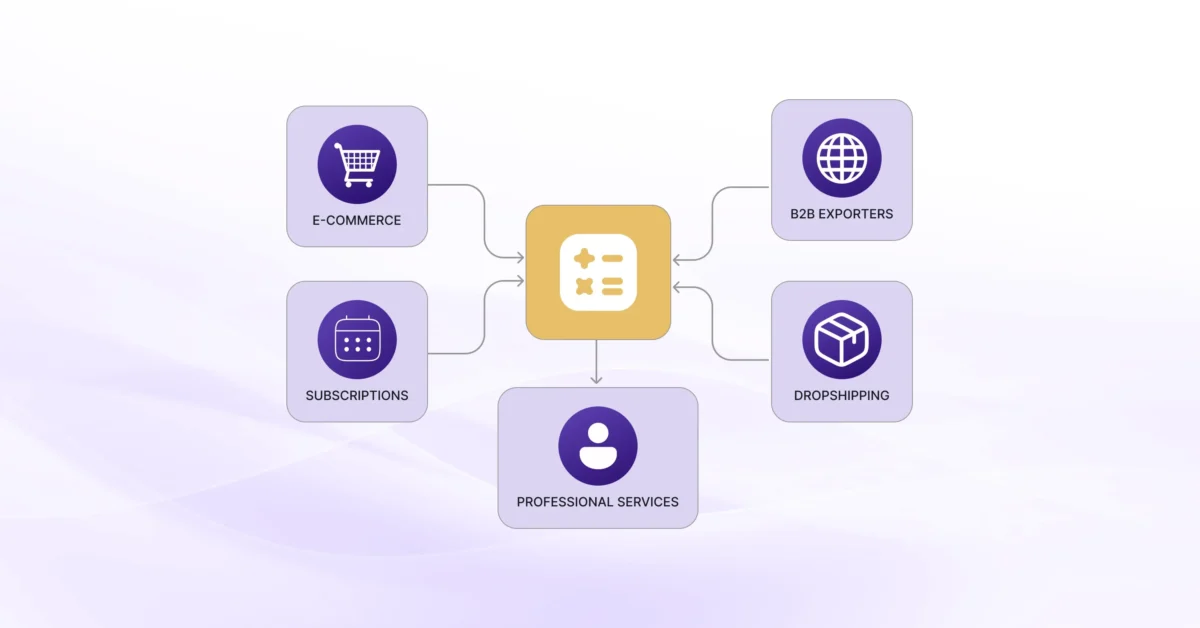
The tool shines beyond one-off invoices. Below are the most common scenarios.
3.1 E-commerce at scale
- Hundreds of daily orders across EU states trigger multiple rate changes
- OSS/IOSS filings simplified when numbers are already split by country and rate.
3.2 Subscription services
- Recurring billing means repeating mistakes if rate is wrong once
- Auto-calculations keep lifetime value reports reliable.
3.3 B2B exporters
- Reverse-charge invoices must show 0% VAT yet list the correct amount that would have applied
- Calculators handle both rates simultaneously.
3.4 Dropshipping and marketplaces
- Supply chain shifts mean goods rarely touch your warehouse
- Quick checks avoid charging VAT twice or omitting it completely.
3.5 Professional services
- Lawyers and consultants face mixed rates for disbursements
- A VAT return calculator separates taxable from non-taxable items in one screen.
Common mistakes to dodge
Even the best VAT tax calculator cannot fix bad data. Watch out for these pitfalls:
- Using last year’s rate: rate changes are frequent, and online tools may lag
- Mixing currencies: calculators show totals, but FX conversions belong in accounting software
- Forgetting special schemes: margin or flat-rate schemes need different formulas
- Skipping negative invoices: credit notes require reversing the VAT, not zeroing it
- Relying on the tool for everything: edge cases, imports, intra-community acquisitions, or place-of-supply quirks often need expert review.
Beware of the costly consequences of non-compliance.
Beyond the standard rate: when to bring in experts
- The EU collected €33 billion through its e-commerce OSS systems in 2024, a 26% jump in one year – proof that digital filings are growing and tax offices demand precision.
- Most calculators cover only the standard VAT rate. Businesses selling food, books, or travel services risk charging the wrong amount since rates vary by product and change with little notice.
- Seasoned consultants can spot these landmines before they appear in your audit report.
- For more insight on the value of working with experts and when to bring in specialist help, see VAT Compliance & Consultancy: Why Expert Advice Matters.
- International sellers can benefit from tailored expertise in VAT Consulting for International Businesses.
Considering multi-rate support, OSS filings, or full compliance? → Try 1stopVAT’s VAT tools and services
Conclusion
A VAT tax calculator cuts invoice prep from minutes to seconds, slashes arithmetic errors, and feeds clean data into your VAT return calculator or accounting suite. Still, tools usually show only the standard rate, while governments juggle dozens of reduced categories. Combine calculators with professional guidance.
Frequently asked questions
A VAT tax calculator focuses on single transactions: it adds or removes VAT from a price. A VAT return calculator aggregates all those transactions into period totals that fit the boxes on your statutory VAT return.
Most free tools display only the headline rate. If you sell goods covered by reduced, super-reduced, or zero rates, verify the percentage manually or use specialist software that lets you override the default rate.
No. OSS requires country-level reporting and audit-ready evidence. A calculator helps you charge the right amount but you still need software or advisors to file consolidated returns, validate customer locations, and store transaction logs.
Quality calculators let you toggle between net-to-gross and gross-to-net. If the tool lacks that feature, you will under- or overstate VAT and the total, leading to wrong invoices and potential fines.
Check at least quarterly and immediately after any public budget or tax announcement. Rate changes often apply from the start of a month, leaving little adjustment time.